
Features
Routing Mode
Let Kumari AI automatically pick the best model for your prompt based on task type, quality, and cost
In Routing Mode, you don't have to think about which model to use Kumari AI analyzes your prompt and automatically routes it to the most suitable LLM. The router considers task type, required capability, response quality, and cost efficiency.
How It Works
When you send a message in Routing Mode, the router evaluates:
- Task type Is this a coding question? Creative writing? Reasoning? Data analysis?
- Complexity How difficult is the prompt? Does it need a frontier model or will a smaller one do?
- Cost Balances output quality against token cost so you're not over-spending on simple tasks
- Context length Routes to models with sufficient context windows for long conversations or large file inputs
The selected model is shown above the response so you always know what was used.
How to Use Routing Mode
Switch to Routing Mode
Type / in the chat input and select Routing.
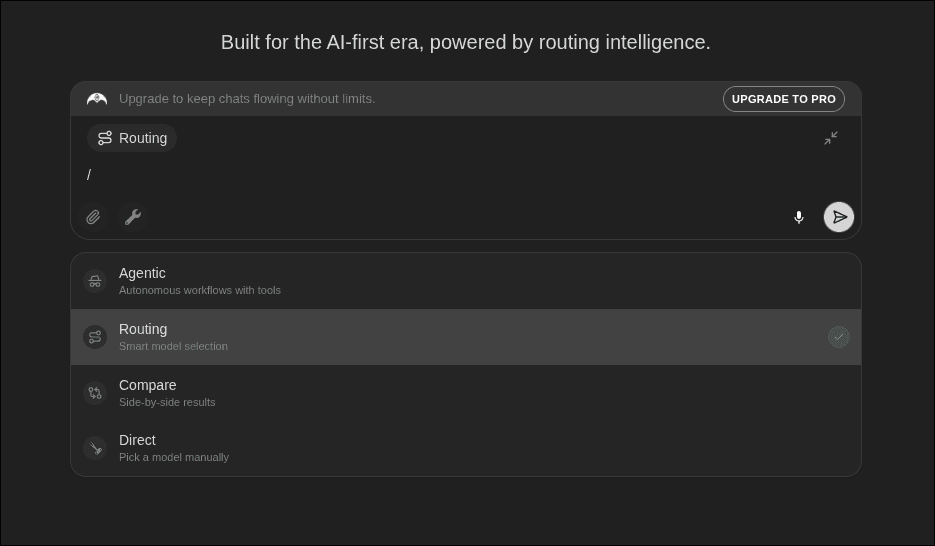
Just type your prompt
No need to tag a model. Write your message naturally and send it.
See the result
The response arrives with a label showing which model was selected. You can override this by switching to Direct Mode at any time.
When to Use Routing Mode
- When you want the best output without thinking about model selection
- During exploration let the router surprise you with its picks
- When working across many different task types in one session
- When cost efficiency matters and you don't need a frontier model every time